

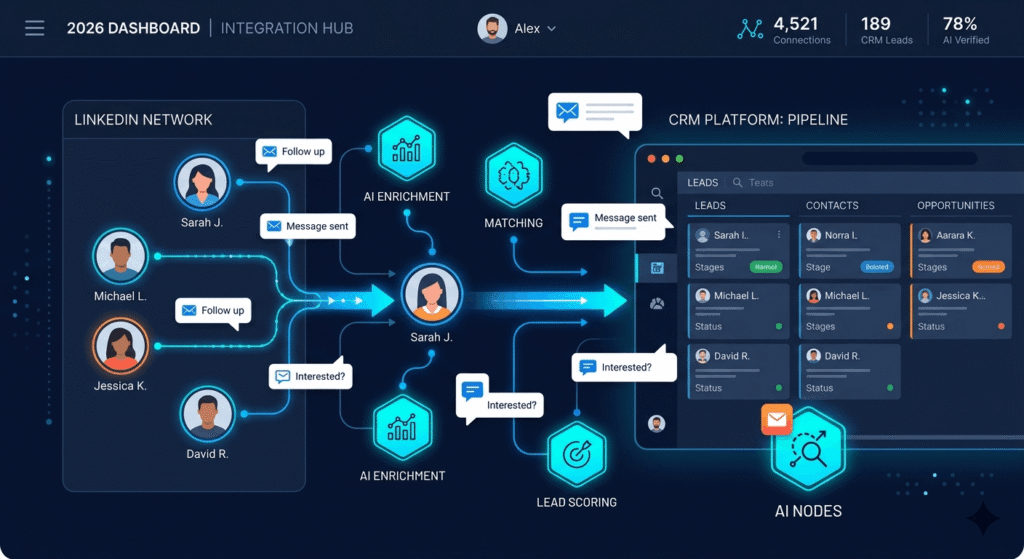
Quick Answer Box: LinkedIn outreach automation tools allow users to automate connection requests, follow-ups, and personalized messaging across LinkedIn at scale. In 2026, platforms such as SalesRobot integrated with GoHighLevel CRM are essential for driving lead generation, boosting response rates, and building automated sales pipelines for growth-focused sales and marketing teams.
What Are LinkedIn Outreach Automation Tools?
LinkedIn outreach automation tools are specialized software solutions that automate the process of sending connection requests, personalized messages, and timely follow-ups on LinkedIn. By leveraging artificial intelligence and workflow automation, these tools help sales and marketing professionals reach massive prospect lists efficiently while keeping communications relevant. In 2026, due to stricter LinkedIn limits and heightened competition for attention, effective use of these tools is vital for pipeline growth and lead generation.
Why Are LinkedIn Outreach Automation Tools Essential for Sales in 2026?
Scaling personalized outreach is challenging and time-consuming if done manually. For modern sales teams, automation software is no longer optional—it is essential for achieving ambitious growth targets on LinkedIn in 2026. Tools like SalesRobot, especially when integrated with leading CRM platforms such as GoHighLevel, transform the sales workflow by automating the repetitive, high-volume tasks that are central to lead nurturing.
Over 89% of B2B marketers leverage LinkedIn for their lead generation strategies. As automation rules become more sophisticated and compliance measures grow more complex, relying on robust outreach automation tools keeps your team competitive and sane. Today’s top solutions use AI to tailor every message, manage outreach within LinkedIn’s weekly limits (typically about 100 connections and 150 DMs per profile), and orchestrate communications across both LinkedIn and email. All activity syncs to your CRM, supporting true sales pipeline automation and ensuring no lead is left behind.
Multi-Channel Outreach: Expanding Beyond LinkedIn
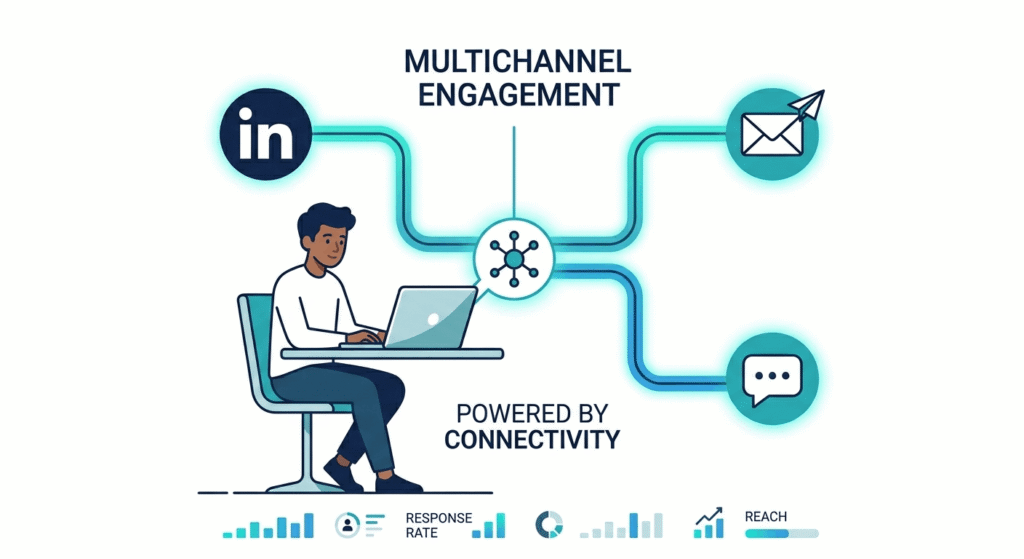
Effective outreach strategies in 2026 blend LinkedIn automation with email automation and, when appropriate, SMS or Twitter touchpoints. Multi-channel campaigns drastically improve engagement by reaching prospects on their channel of choice. For example, if a LinkedIn message is ignored, your automation tools can automatically trigger a follow-up email, maximizing response opportunities and increasing total engagement rates.
Compliance and Sales Pipeline Automation
With new privacy and compliance rules continually evolving, reliable outreach automation software helps ensure safe, scalable prospecting practices. Top tools maintain “human-mimicking” scheduling and cloud-based delivery, which protect LinkedIn accounts from unwanted bans or restrictions. Pairing automation with CRM integrations enables seamless follow-ups, activity logging, and sales pipeline movements, supporting a holistic and compliant sales process.
What Are the Top Benefits of LinkedIn Outreach Automation Tools?
LinkedIn outreach automation tools transform both individual and team performance for B2B sales and marketing by offering a range of strategic benefits:
- Saves Time and Boosts Efficiency: By automating connection requests, follow-ups, and drip campaigns, these tools save hours each week. Sales teams can focus on higher-value activities instead of manual messaging.
- AI-Powered Personalization: AI-driven variables insert prospect-specific details, track recent LinkedIn activity, and can even attach personalized voice or video notes, ensuring messages break through the noise.
- Integrated Multi-Channel Workflows: Advanced automation software enables simultaneous outreach via LinkedIn, email, and even other channels, orchestrating multi-touch sequences that reach recipients where they’re most active.
- CRM Integrations and Data Consistency: Platforms like GoHighLevel seamlessly integrate so that every lead, conversation, and touchpoint is automatically logged, eliminating data silos and keeping sales reports up-to-date.
- Scalable for Agencies and Teams: Unified dashboards and white-label features mean agencies managing multiple client accounts easily monitor performance and maintain brand consistency.
- Enhanced Reporting and Analytics: Track vital metrics such as acceptance, reply, and conversion rates to identify what works and continuously optimize campaigns.
- High Conversion Rates: Many users see over 54% acceptance and 49%+ response rates, while integration with GoHighLevel CRM contributes to shortened sales cycles and improved lead-to-opportunity conversion.
AI Personalization in Outreach Automation
Personalization is now more than using a name token. Modern AI analyzes recent prospect activity, adjusts tone, and attaches impactful multimedia, resulting in conversational messages that stand out. This deep personalization can double response rates and move more conversations to your pipeline. Tools like SalesRobot are leading examples, putting sophisticated AI personalization at the heart of sales automation.
CRM Integrations and Data Management
CRM integrations—such as GoHighLevel’s link with SalesRobot—connect outreach with deeper sales operations. This ensures every reply, engagement, or new connection on LinkedIn triggers CRM pipelines, reminders, or automated next steps. Agencies and businesses benefit from less data entry, full reporting, and a 360-degree view of pipeline velocity.
How Do Sales Automation and CRM Integrations Change the Game?
Sales automation software, when paired with robust CRM integrations, fundamentally streamlines your lead management and sales pipeline automation. These connections eliminate the risk of lost leads and enable every engagement to transform into actionable outcomes.
- Real-Time Lead Syncing: As soon as a new LinkedIn lead engages, their details and activities are automatically pushed into your CRM.
- Automated Workflow Triggers: You can set up workflows so pipeline stage changes, reminders, or follow-up sequences are initiated based on LinkedIn interactions.
- Unified Pipeline Visibility: Every sales touchpoint across LinkedIn and email can be tracked with analytics, providing a single source of truth.
This interconnected workflow elevates your outreach automation from a simple series of messages to a dynamic, multi-channel process that guides prospects from initial contact to closed deals—reducing errors and covering gaps that can occur in manual processes.
The Role of Email Automation in Outreach
Email automation can supplement LinkedIn outreach by creating parallel or fallback communication channels. If a prospect does not respond on LinkedIn, the system can trigger a sequence of personalized emails, which increases engagement rates and nurtures leads further down your sales pipeline.
How SalesRobot + GoHighLevel CRM Integration Works in 2026
The SalesRobot and GoHighLevel CRM integration bridges the gap between LinkedIn outreach automation tools and full sales workflow management. This integration simplifies manual processes, keeps all touchpoints visible, and allows both agencies and sales teams to scale campaigns with confidence.
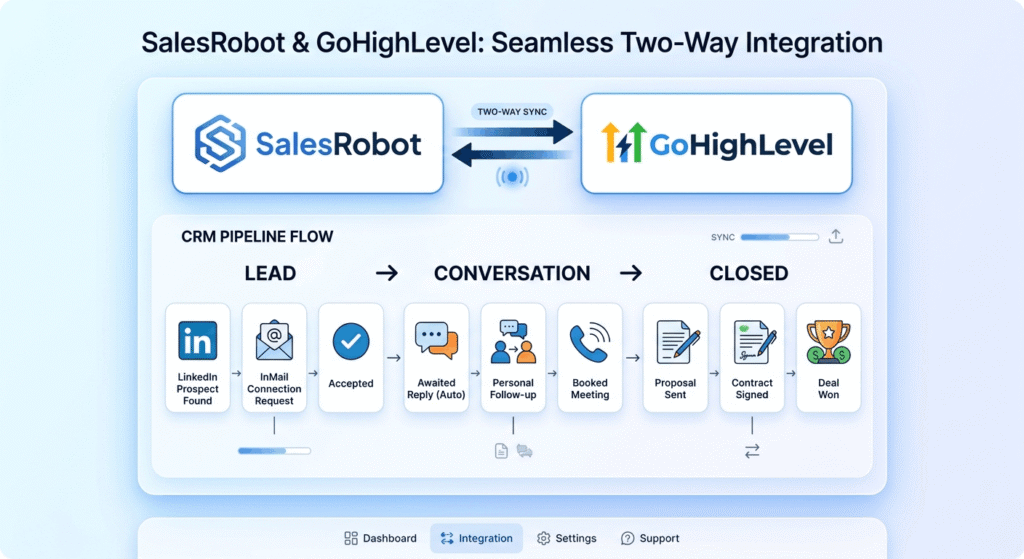
- Account and Campaign Data Sync: SalesRobot automatically brings LinkedIn leads, replies, and campaign progression into GoHighLevel, ensuring all prospect activity is reflected in your CRM.
- Automated Triggers and Drip Campaigns: Set automation rules for moving leads, assigning follow-up tasks, or starting new campaigns based on LinkedIn engagement.
- Multi-Channel Throttling and Compliance: Smart spacing of messages and human-like scheduling protect LinkedIn accounts from exceeding platform limits, helping agencies manage multiple profiles safely.
- Comprehensive Dashboard: Sales, marketing, and project management teams can monitor campaign progress, adjust sequences, and review results straight from one GoHighLevel dashboard.
- Agency-Ready, White-Label Options: For client management, agencies reap the benefits of white-labeled dashboards that are customizable and scalable.
- Flexible Pricing and Trials: SalesRobot starts at $59/month per account with a 14-day free trial, while GoHighLevel starts at $97/month with an unlimited plan available.
Supported Automation Flows
SalesRobot and GoHighLevel support these flows:
- Automated, AI-personalized connection requests and follow-ups
- Multi-step drip campaigns triggered by behaviors or time-delays
- Multi-channel touchpoints (LinkedIn, email, sometimes Twitter/SMS)
- Instant activity logging in CRM, ensuring precise pipeline management
Unique Selling Points of This Integration
- Cloud-Native Security: Prevents account bans by avoiding risky browser extensions.
- Multi-Account Management: Designed for agencies and teams, enabling easy handling of numerous LinkedIn profiles.
- Advanced AI Personalization: Use of real prospect data and behavioral tracking for highly targeted messaging.
- Workflow Automation: Every LinkedIn action can trigger further sales automation, pipeline movements, and internal workflow processes.
Key Limitations & Troubleshooting
- Sync Issues: Direct API integrations minimize errors, but regular reviews of high-volume campaigns ensure data maps correctly.
- Reporting Gaps: While most LinkedIn and email activities sync to GoHighLevel, advanced or cross-platform analytics might need custom reporting.
- Platform Compliance: Automation must keep up with LinkedIn’s evolving safety requirements. Both SalesRobot and GoHighLevel update regularly to address compliance and safety.
Get the latest integration instructions from the SalesRobot official GoHighLevel integration guide.
How to Automate LinkedIn Outreach with SalesRobot and GoHighLevel
- Sign Up for SalesRobot and GoHighLevel
–Register at SalesRobot for the free 14-day trial.
–Create your GoHighLevel CRM account (starting at $97/month). - Connect LinkedIn Account to SalesRobot
–Securely link your LinkedIn profile in the SalesRobot dashboard.
–Set up multiple accounts if you manage several outreach profiles. - Install GoHighLevel Integration
–In GoHighLevel, access the marketplace and install the SalesRobot or compatible LinkedIn outreach automation app.
–Authorize SalesRobot and complete CRM sync. - Import or Build Campaign Sequences
–Use SalesRobot’s campaign builder for LinkedIn outreach automation tools, including connection requests, follow-ups, and messaging.
–Set up AI personalization, define channel-specific triggers, and schedule delays. - Configure CRM Workflows and Triggers
–Map campaign actions to pipeline stages or opportunity creation in GoHighLevel.
–Create rules for outreach automation: follow-up timing, cross-channel triggers, and automated task assignments. - Personalize Messaging and Drip Campaigns
–Utilize dynamic fields (name, company, job role, activity) and consider adding voice or video content for extra impact.
–Build multi-step drip campaigns for higher engagement. - Monitor Campaigns and Refine Sequences
–Track metrics like acceptance and reply rates in GoHighLevel.
–Tune campaign steps for optimal results and ensure compliance with LinkedIn weekly messaging limits. - Scale Up for Teams or Agencies
–Onboard additional LinkedIn profiles for larger outreach.
–Use centralized dashboards for collaboration, lead assignment, and reporting.
For complex customizations—like advanced AI integration, web-to-CRM integration via your website development platform, or bespoke analytics—you may want to partner with automation and CRM experts.
How to Set Up Drip Campaigns and Automate Your Sales Pipeline
Drip campaigns form the backbone of advanced sales pipeline automation. LinkedIn outreach automation tools let you:
- Craft sequences of messages tailored to the recipient’s actions on LinkedIn and email.
- Assign rules for follow-ups, channel switching, or pipeline movement if leads go dark.
- Personalize every step with automation software, leveraging AI to write more “human” messages.
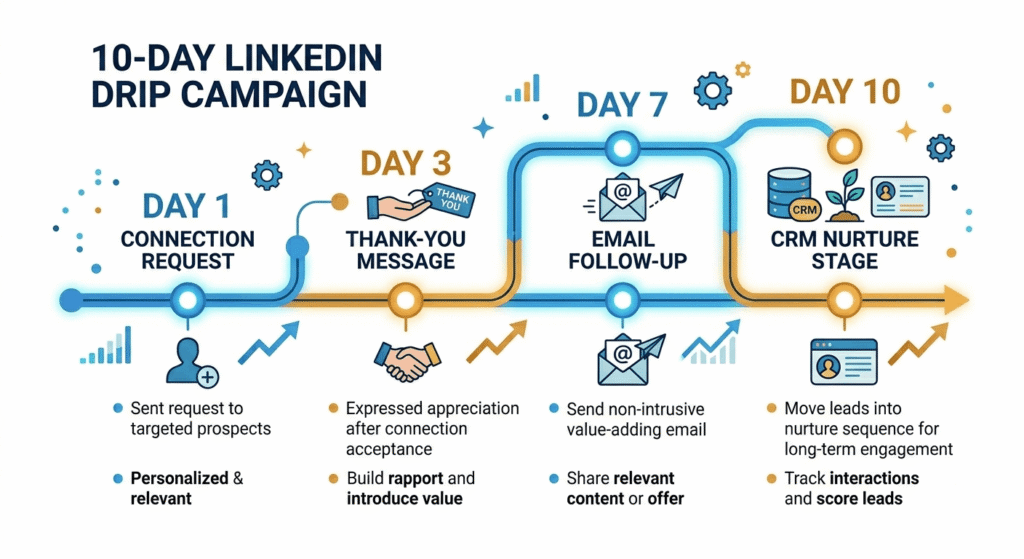
Example Drip Campaign
- Day 1: Send LinkedIn connection request with a relevant intro using automation tools.
- Day 3: If the connection is accepted, deliver a thank-you and value offer.
- Day 7: No response? Trigger an email automation follow-up through GoHighLevel CRM.
- Day 10: Still quiet? Move prospect to CRM for longer-term nurturing.
Sales automation ensures every prospect is touched at each stage—no forgotten leads or repeated manual entry, freeing up team resources for closing deals.
Automating Stages with Sales Pipeline Automation
By configuring sales automation rules, a LinkedIn reply might promote a lead to “Conversation Started” in your CRM. An email engagement can create a task for a phone call, and cold leads can be recycled into nurture campaigns. This deep automation not only saves time but closes the gaps in the sales journey.
Comparing LinkedIn Outreach Automation Tools (2026)
Reviewing the landscape of LinkedIn outreach automation tools helps identify which platform best suits your workflow:
| Tool | LinkedIn Automation | Multi-Channel | CRM Integrations | AI Personalization | Account Safety | Team & Agency Features | Pricing (2026) |
|---|---|---|---|---|---|---|---|
| SalesRobot | Yes | LinkedIn & Email | GoHighLevel, native CRMs | Advanced (Voice, AI vars) | Cloud-native, strong | Multi-account, white-label | $59/mo+ (trial/volume) |
| Expandi | Yes | LinkedIn & Email | Zapier, HubSpot, Salesforce | Hyper (GIFs, images) | “Human mimic” | Team dashboards | $99/mo |
| La Growth Machine | Yes | LinkedIn, Email, Twitter | Native CRM sync | Enrichment, context AI | Cloud-safe | Multi-account | €60/mo/identity |
| HeyReach | Yes | LinkedIn-only | None yet, Zapier | Standard | Cloud, agency-level | Best for agencies | Custom |
| Closely | Yes | LinkedIn-only | GoHighLevel (native) | AI-personalization | Cloud-safe | Agency/white-label | ~$49/mo |
| Dux-Soup | Yes | LinkedIn-only | HubSpot, Salesforce, Pipedrive | Limited | Extension/cloud | Solo/small team | $14.99+/mo |
| Waalaxy | Yes | LinkedIn & Email | Zapier, CSV import | Template-based | Cloud-safe | Simple, beginner | Free – paid |
Key Criteria in 2026:
- Choose cloud-only architecture and full CRM integrations for compliance and scale.
- Look for AI-powered personalization if higher response rates are critical.
- Agencies and multi-account users should seek robust dashboards and white-label features.
For more peer-reviewed tool insights, see Meet Alfred’s blog on LinkedIn outreach automation or the LinkedSDR best LinkedIn automation tools guide.
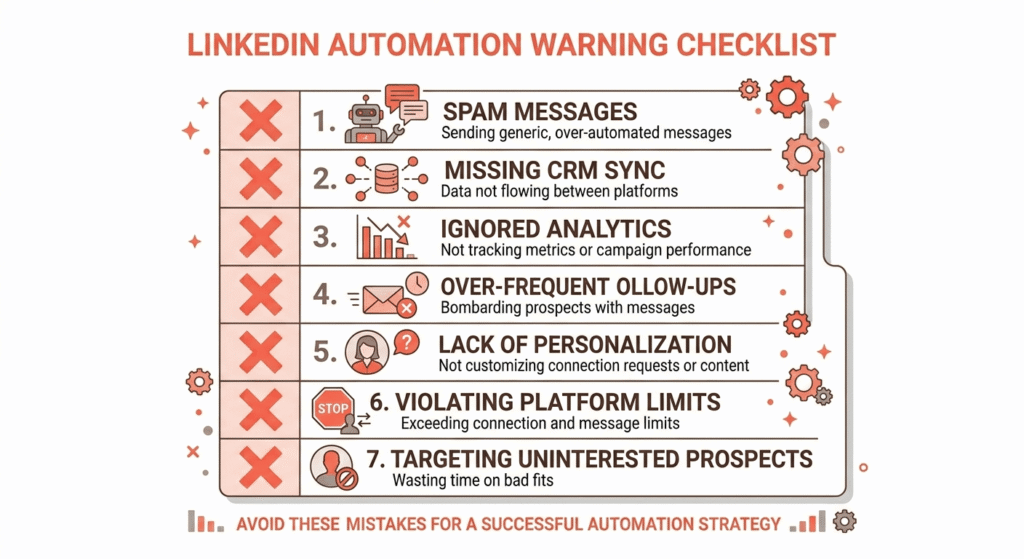
Common Mistakes to Avoid with LinkedIn Outreach Automation
The right outreach automation tools help avoid pitfalls, but some mistakes can severely impact results:
- Sending Excess Messages: Exceeding LinkedIn’s connection and DM limits risks account suspension.
- Ignoring Personalization: Failing to use AI for tailored message creation leads to low engagement.
- Neglecting CRM Integrations: A lack of CRM sync results in lost leads and scattered reports.
- Using Browser Extensions Insecurely: Stick to trusted cloud automation software for safety and compliance.
- Scaling Without Supervision: Automation tools should have centralized monitoring to manage multiple client accounts effectively and safely.
- Setting and Forgetting Drip Campaigns: Frequent reviews of campaign messaging and analytics are needed to avoid “spammy” or outdated outreach.
- Not Leveraging Analytics: Without tracking metrics, teams lose the ability to optimize or demonstrate return on investment.
Decision Guide: Selecting the Best LinkedIn Outreach Automation Tools for Your Sales Workflow
Selecting the right LinkedIn outreach automation tools, CRM integrations, and sales automation platforms depends on your goals, team size, and outreach complexity:
- Agencies Managing Many Accounts: Consider platforms like SalesRobot, HeyReach, or Closely, which offer centralized dashboards and white-label options for client reporting.
- CRM-Driven Sales Teams: Opt for tools supporting native GoHighLevel, HubSpot, or Salesforce CRM integrations, enabling seamless sales pipeline automation and reporting.
- Advanced Personalization Needs: Prioritize automation tools and software with leading AI personalization and multi-channel outreach capabilities, such as SalesRobot, Expandi, or La Growth Machine.
- SMBs and Solo Teams: Starter-friendly software like Dux-Soup or Waalaxy might suffice but plan for future multi-account and compliance needs.
- Proof of Value Is Essential: Take advantage of free trials, measure results early, and judge vendor support before widescale adoption.
Looking for a complete solution? Explore UI/UX & Graphic Design services, MVP development solutions, and the Prompt Generator AI case study for inspiration on custom outreach automation.
FAQs
1. What are the main risks of using LinkedIn outreach automation tools?
Cloud-based outreach automation software like SalesRobot or Expandi minimizes threats but cannot eliminate them fully. LinkedIn may issue warnings or bans if you exceed messaging limits, appear spammy, or use unapproved browser extensions. Always use human-mimicking settings, compliant strategies, and tools with adaptive safety features.
2. How does AI personalization improve campaign response rates?
AI personalization leverages prospect data and behaviors to customize every message—incorporating variables like name, company, or recent activity. This deep outreach automation feels authentic and drives much higher acceptance and reply rates, commonly above 49%, as recipients see genuine effort and value.
3. Is GoHighLevel CRM integration required for automation?
While SalesRobot and similar LinkedIn outreach automation tools can work stand-alone, integrating with GoHighLevel CRM enables pipeline automation, seamless follow-up, and unified analytics, streamlining your operation and improving overall results.
4. What types of campaigns can be automated on LinkedIn with these tools?
You can automate everything from connection requests and multi-step drip campaigns to reply-triggered follow-ups, content sharing, and cross-channel outreach. Advanced automation software allows full journey management, including emails and CRM-driven tasks.
5. Can agencies manage multiple LinkedIn accounts safely?
Yes, platforms like SalesRobot and HeyReach are specifically designed with agency needs in mind, offering multi-account safety features, centralized monitoring, and compliance checks. Avoid browser-only extensions and routinely review analytics inside the dashboard to protect client accounts.
Conclusion
LinkedIn outreach automation tools have become indispensable for modern B2B sales, especially when paired with robust CRM integrations like GoHighLevel. The integration of SalesRobot offers unmatched pipeline visibility, efficiency, and AI-powered personalization. As LinkedIn’s landscape shifts and competition grows, agencies and businesses equipped with compliant, scalable outreach automation software will be best positioned for sustainable growth in 2026. Start your SalesRobot trial, connect it with GoHighLevel, or learn more about our development work and our story to discover how tailored outreach can drive your sales pipeline forward.