

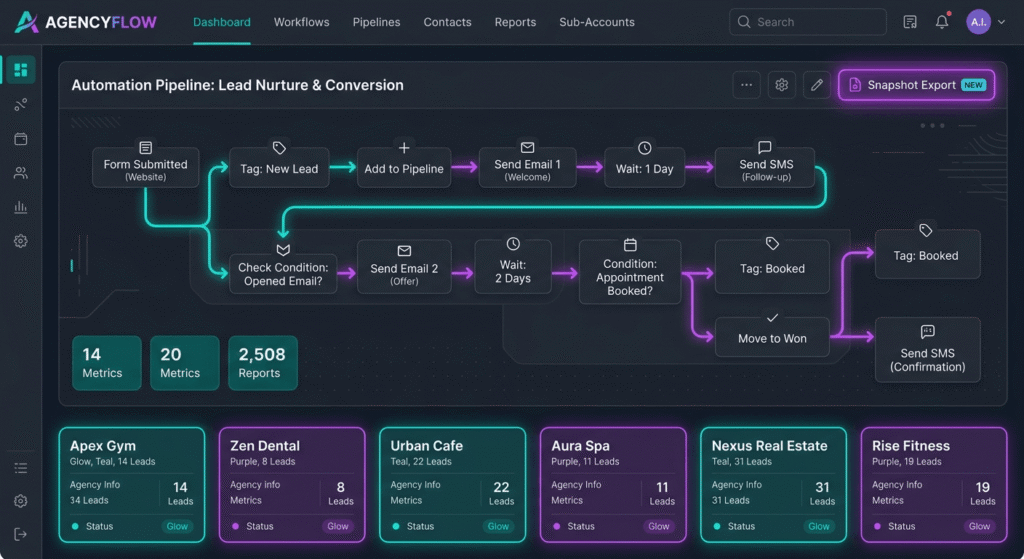
Quick Answer Box: A GoHighLevel SaaS Snapshot is a reusable, version-controlled package for deploying CRM automation, workflows, funnels, and AI integrations to client accounts. By using GoHighLevel SaaS Snapshot, agencies can standardize systems, streamline onboarding, and efficiently sell AI automation packages at any scale.
What is a GoHighLevel SaaS Snapshot?
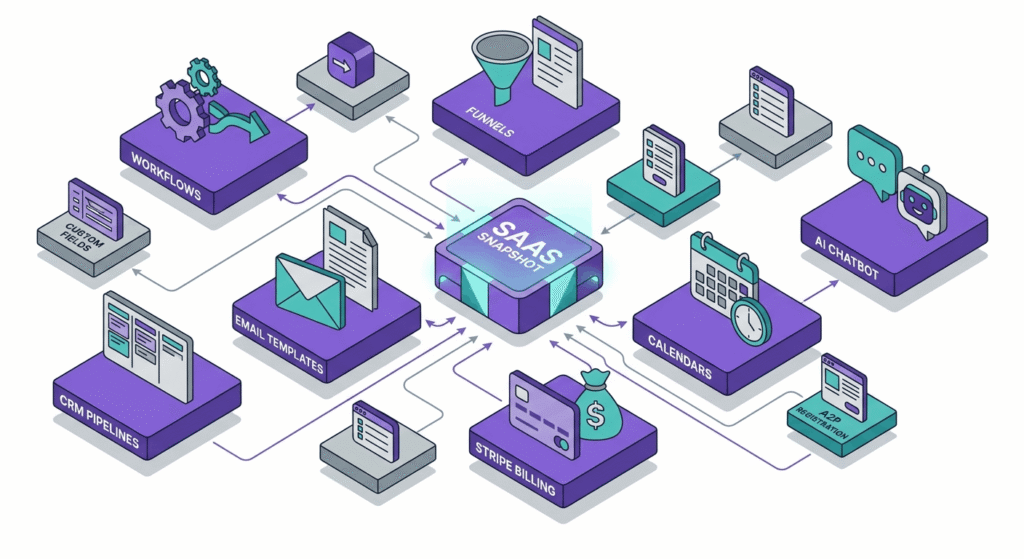
A GoHighLevel SaaS Snapshot is a reusable, version-controlled template that captures all your CRM automation, workflows, revenue automation settings, and supporting assets within a master client sub-account. In GoHighLevel SaaS mode, this snapshot becomes a launchpad for agencies and SaaS creators to instantly deploy, iterate, and productize automation technology, including AI integrations and workflow builder tools, for nearly any niche or industry.
Core Benefits and Use Cases of GoHighLevel Snapshots
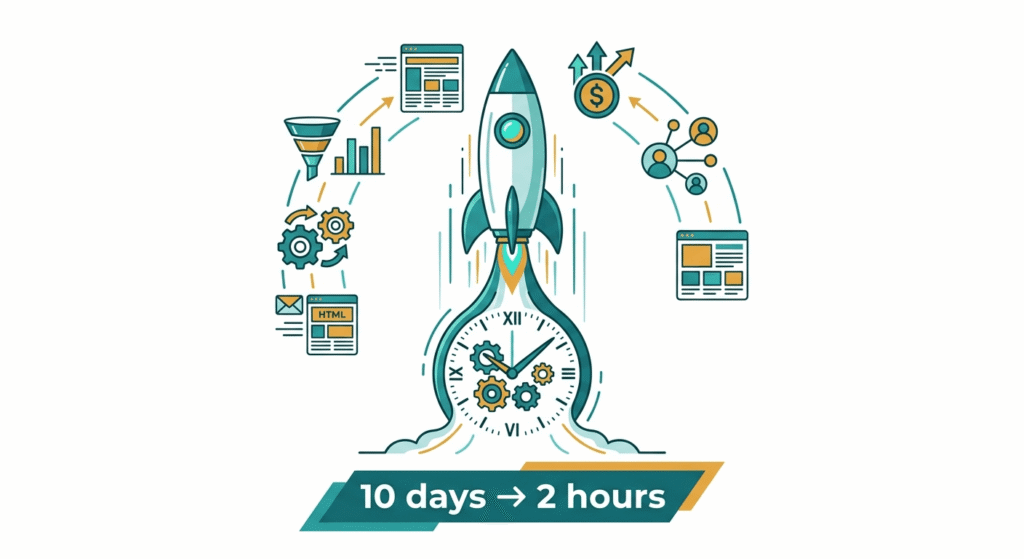
GoHighLevel SaaS Snapshots are transforming the service delivery process for agencies and SaaS providers. Snapshots enable seamless, standardized onboarding for every new client, drastically reducing project setup from weeks to hours. Agencies have reported saving up to $525 per client onboarding, which significantly frees up resources for sales growth, innovation, and advanced services.
Standardizing onboarding with GoHighLevel SaaS Snapshots ensures that each client receives a robust CRM automation solution. This approach eliminates manual errors and guarantees that every automation, funnel, and workflow builder component meets your latest standards. Additionally, using snapshots through GoHighLevel’s SaaS mode opens opportunities for white-labeling and reselling, allowing your agency to build branded, industry-ready “business in a box” solutions.
Revenue automation also becomes easier and more predictable. By deploying recurring billing, automated reporting, and communication templates from within each snapshot, agencies can quickly establish recurring and one-time payment streams. Rapid product and campaign launches become feasible, as pre-built funnels, AI integrations, and lead generation systems are ready for use in any context.
A growing number of agencies credit GoHighLevel SaaS Snapshots as the strategy that scaled their monthly recurring revenue from a handful of retainer clients to over $10,000–$22,000. Improved onboarding has led to retention rate increases of 30–50% for firms that include value-added automation packages with regular updates.
Real-World Impact of GoHighLevel SaaS Snapshot
For example, an agency serving mortgage brokers used GoHighLevel SaaS Snapshot to package CRM automation, custom lead generation funnels, and AI receptionist workflows. They reduced client onboarding from ten days to two hours per account. With this system, new verticals such as healthcare, real estate, and coaching can be entered effortlessly, as workflows and revenue automation can be rebranded and redeployed across industries.
Key Features Included in GoHighLevel SaaS Snapshots
GoHighLevel SaaS Snapshots are designed to capture and deploy a comprehensive set of assets, making them ideal for agencies seeking all-in-one revenue automation and workflow builder power.
Asset Types Supported
- Workflows: Automated processes and campaign flows for sales and marketing.
- CRM Automation: Custom pipelines, tags, contact segments, and field management.
- Funnels & Websites: Multi-step sales funnels, opt-in flows, and full websites.
- Forms & Surveys: Lead capture forms and feedback tools for data collection.
- Calendars & Booking: Integrated scheduling for appointments and calls.
- Triggers & Trigger Links: Automated actions based on user behaviors.
- Products & Membership Offers: Sales items, re-billing structures, and memberships.
- Email & SMS Templates: Ready-made communication templates for all stages.
- Surveys, Documents, Contracts: Tools for onboarding, engagement, and e-signing.
- Dashboards & Reporting: Custom reporting for SaaS Pro users, vital for client insight.
- AI Integrations: Agent Studio workflows, chatbot scripts, AI receptionist, knowledge bases, and tone-of-voice libraries.
Limitations and Compatibility
Some elements are not included in GoHighLevel SaaS Snapshot:
- Live Data: Contacts, conversations, and history are excluded for privacy and compliance.
- Late-Added Assets: New assets created after the snapshot’s version are not included.
- Certain Third-Party Apps: Some integrations require client-level authorization and must be connected separately.
- Generic Lead Forms: Unrelated or non-contextual lead forms are omitted.
GoHighLevel consistently expands its snapshot asset compatibility. To stay current and avoid compatibility issues, always consult the official GoHighLevel documentation before building or deploying enterprise-level automation packages.
Plan Requirements for SaaS Automation
Not all revenue automation or AI integration features are available to every GoHighLevel user. SaaS Mode or SaaS Pro is often required for advanced dashboards, role-based asset delivery, and custom billing setups. Before selling or sharing cross-plan packages, verify which features fit your clients’ existing GoHighLevel subscription.
How to Build a GoHighLevel SaaS Snapshot: Step-by-Step Guide
Building a GoHighLevel SaaS Snapshot that’s ready for commercial deployment requires methodical setup, exhaustive testing, and thorough documentation. Here is a detailed, step-by-step guide:
- Design Your Master Sub-Account
Set up a new master sub-account in GoHighLevel. This will serve as your canonical template. Include only production-ready workflows, CRM automation, funnel systems, and AI integrations. Use a structured asset naming system, such as “Snapshot_V1_BookingWorkflow,” for traceability and version control. - Build Out Automation Assets
Employ the workflow builder for sequenced automations: email/SMS nurture campaigns, lead distribution, appointment reminders, and AI receptionist handoffs. Construct conversion funnels and websites tailored to your niche. Incorporate CRM automation components, such as pipeline stages, tagging logic, and advanced forms. Add AI-powered features by embedding Agent Studio automations, custom knowledge bases, and branded chatbot flows. Configure revenue automation systems, including products, offers, calendars, and booking links. Prepare white-label email, SMS, and landing page templates for re-use. Integrate Stripe for billing and Twilio for call/SMS rebilling directly into your setup. - QA and Test All Processes
Before snapshotting, run each workflow and funnel sequence with test data. Confirm that all CRM automation triggers and revenue automation modules function as intended. Check that Stripe, Twilio, WhatsApp, and Messenger integrations respond correctly. Validate that AI agents and chatbots act as expected and can escalate complex cases to human support. Walk through the client’s entire journey to identify gaps. Use a comprehensive checklist for trigger logic, permissions, automation flows, form accuracy, and documentation quality. Remove all demo or placeholder data and ensure the snapshot is “client-ready.” - Create the Snapshot
From the agency dashboard, select your master sub-account. Click “Create Snapshot,” then review the asset checklist presented by GoHighLevel. Deselect any assets that should remain agency-exclusive. Apply clear naming and include an internal changelog or setup note, using platforms like Notion or embedded Loom videos for instructions. - Export and Deploy
Upon saving, your GoHighLevel SaaS Snapshot launches into your agency library. Import to any new or current client sub-account, using selective asset replacement to prevent overwriting bespoke data. Adjust deployment to include only the necessary workflows and automation modules. - Document and Store for Version Control
Archive every version of your snapshot along with documentation in a shared repository such as Notion or Google Drive. Maintain a log of included assets, update dates, issues, and clear step-by-step activation guides. This documentation supports ongoing version control, easy resale, and smoother onboarding for team members and clients alike.
Best Practices for Snapshot Version Control and Maintenance
Proper version control underpins every successful GoHighLevel SaaS Snapshot operation. The absence of structure can lead to chaotic updates, inconsistent automation delivery, and unhappy clients.
Versioning Examples for Clarity and Consistency
Adopt a semantic naming convention for each release, such as `SaaSVerticalAI_V1.0_2026`. Increment the major number for structural changes, the minor for small enhancements, and the patch for hotfixes. For example:`
- BookingProAI_V2.0` — Full asset restructure
- `BookingProAI_V2.1` — Minor workflow builder adjustment or updated AI integration
- `BookingProAI_V2.1.1` — Small bug fix within a revenue automation step
Maintaining an Update Log and Change History
Always keep a detailed changelog, accessible to both your internal team and external buyers. Record new features, bug fixes, and removed functionalities. Use a shared Notion page or document repository, linking it directly to your product or support materials.
Rolling Out Updates
GoHighLevel’s selective import lets you apply changes only to specific assets, preserving client customizations. Notify your clients before deploying major updates and supply clear, step-by-step upgrade instructions. Retain legacy versions for clients needing to delay upgrades, ensuring long-term support and flexibility.
Integrating Client Feedback
Solicit client input after every deployment. Incorporate usage analytics or qualitative feedback to refine CRM automation, improve lead generation capabilities, and enhance AI integrations in the next version. Continuous improvement leads to increased snapshot adoption and higher client satisfaction.
Testing Each Version for Reliability
Regression-test every new version within a separate staging account before release. Simulate real lead generation, workflow builder triggers, revenue automation, communication, and report delivery to ensure every function is reliable.
Documenting and Communicating
Effective communication is crucial for successful snapshot upgrades. Share changelogs, update notices, and user guides through automated emails or in-app notifications. Clear instructions accelerate adoption and reduce support tickets.
GoHighLevel SaaS Snapshot Features vs. Alternatives
| Feature/Asset Type | GoHighLevel SaaS Snapshot | Manual Setup | Legacy Export/Import | Other SaaS Tools |
|---|---|---|---|---|
| Workflow Builder Included | Yes | No | Partial | Varies |
| CRM Automation Packaged | Yes | No | Partial | Varies |
| Funnels/Websites Included | Yes | Rarely | Partial | Some |
| AI Integrations (Agent Studio) | Yes (SaaS Pro & above) | Manual | Rarely | Some |
| Version Control | Yes (with naming & docs) | None | Minimal | Varies |
| Bulk Asset Deployment | Instant via import | Slow, manual | Time-consuming | Varies |
| Custom Documentation | Supported/Bundled | Manual | Rare | Varies |
| Billing & Revenue Automation | Yes (Stripe, Twilio, GHL) | Manual integrations | Not consistent | Mostly manual |
| Plan/Role-Based Asset Filtering | Supported | No | No | Some |
| Marketplace Access | Yes | No | No | Limited |
GoHighLevel SaaS Snapshot demonstrates major advantages for agencies seeking streamlined CRM automation, workflow builder systems, version control, and built-in revenue automation—all within one unified platform. In contrast, manual or legacy import/export processes are time-consuming, less reliable, and lack scalability, especially when incorporating advanced AI integrations and lead generation frameworks.
Incorporating AI Automation into Your Snapshots
AI integrations have become essential in differentiating high-value GoHighLevel SaaS Snapshots. Embedding robust AI automations, such as Agent Studio workflows and intelligent receptionist flows, enhances your package appeal and supports higher price points.
Elevating Packages with AI Integrations
Agent Studio:
This intuitive drag-and-drop builder empowers agencies to design AI-powered sales and support bots using custom natural language prompts, escalation logic, and conversation flows. Standardize and package these assets within each GoHighLevel SaaS Snapshot.
AI Receptionist:
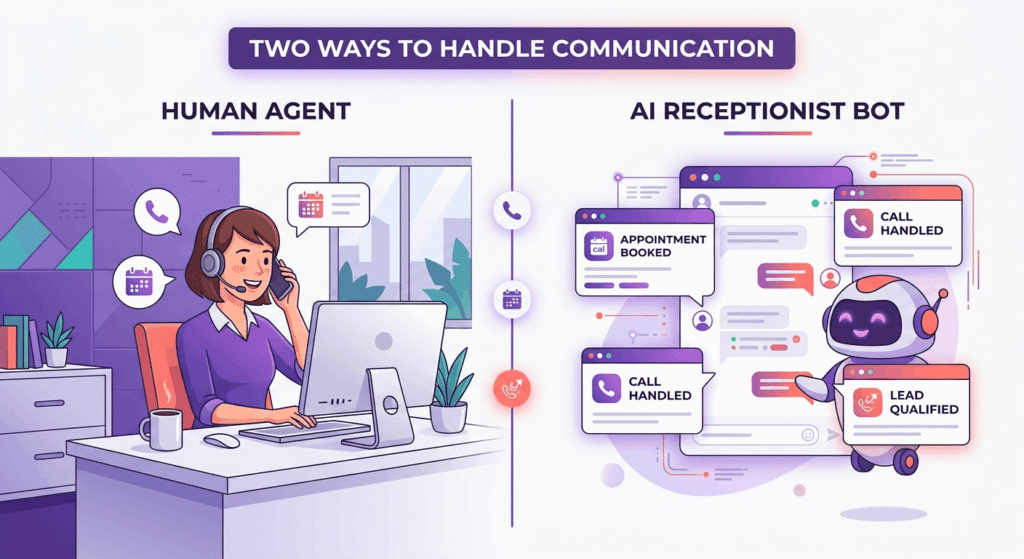
Enable 24/7 call handling, real-time lead qualification, automated bookings, and data enrichment. Snapshots can transfer complete receptionist logic, niche-specific knowledge bases, and personalized voice/tone configurations for your target clientele.
Workflow Builder with AI Triggers:
Combine CRM automation and AI decision rules to initiate personalized outreach, book appointments, or surface the best leads to sales agents—fully automatic and always on.
Evolving AI Integrations:
New features allow you to snapshot bot training data, dynamic conversation presets, and industry-specific knowledge base articles, ensuring your packages remain at the cutting edge as GoHighLevel upgrades the AI suite.
Lead Generation and Engagement:
AI bots pre-qualify leads, segment contacts, initiate drip campaigns, and hand off sales-ready opportunities for real-time conversion. This increases pipeline velocity and client satisfaction.
Agencies leveraging AI-powered GoHighLevel SaaS Snapshots often experience a 20–40% lift in conversion rates and higher customer loyalty, thanks to more adaptive automation, consistent results, and perceived innovation.
AI Automation and Value Proposition
The value proposition for agencies lies in transforming each GoHighLevel SaaS Snapshot into a packaged “business in a box,” featuring always-on lead generation, AI-driven customer service, and actionable analytics. Clients are drawn to automation packages that are future-proof, intuitive, and scalable, providing your agency with competitive differentiation and reliable recurring revenue.
How to Sell GoHighLevel Snapshots and AI Automation Packages
Monetizing GoHighLevel SaaS Snapshots, with a focus on AI automation packages, is all about offering a bundled, outcome-oriented solution and using clear value-based messaging.
Productizing Automation Offers
Bundle essential automation workflows, bespoke CRM automation, proven lead generation funnels, and intelligent AI integrations into themed packages such as “Dental Practice AutoPilot” or “Mortgage Broker AI Suite.” Back your offer with rich documentation, including video walkthroughs (Loom), detailed written guides (Notion), and white-label help resources. Prompt Generator AI and High-Converting Website for RevSquared AI provide examples of leveraging snapshots in real client projects.
Revenue Automation and Flexible Pricing
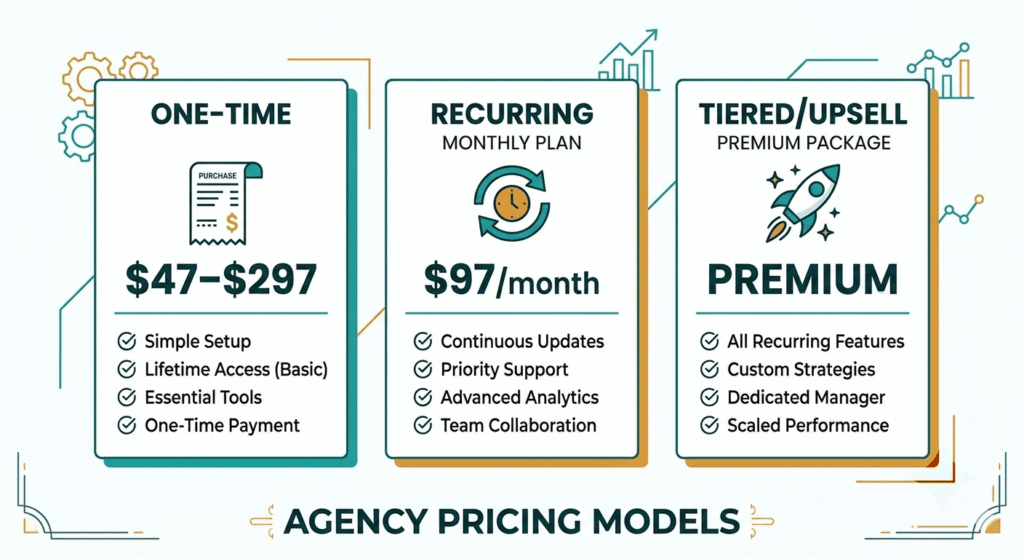
Structure offers using:
- One-Time Payment: Sell full GoHighLevel SaaS Snapshot solutions for between $47 and $297, depending on their complexity.
- Recurring Subscription: Offer access to a private “template club” or continually updated automation package at $97/month or more. Agencies report retention rates are 30–50% higher using this model.
- Tiered and Upsell Pricing: Package more advanced AI integrations, workflow builder customizations, or consulting as premium options. Unlock elite features, priority onboarding, or compliance workflows for an additional fee.
Examples have shown agencies adding $10,000 through one-off snapshot releases, or securing $3,000/month with recurring “automation-as-a-service” offers.
Selling Channels for GoHighLevel SaaS Snapshot
- Official Marketplace: List your automation packages and templates directly in the GoHighLevel Snapshot Marketplace to reach agencies actively searching for ready-built solutions.
- Niche Communities and Groups: Share unique, verticalized offers in GoHighLevel Community & Groups, niche agency forums, or on LinkedIn for targeted exposure.
- Private Licensing: Sell bundled or white-label access to your best GoHighLevel SaaS Snapshots, licensing solutions for bulk buyers or consultants that support cross-industry needs.
- For more robust transformation, tie your GoHighLevel SaaS Snapshot offers to bespoke Design, MVP, or Development services.
Supporting Clients and Verticalizing Your Offer
Support your automation packages by offering onboarding assistance, video walkthroughs, lifetime updates, or optional consulting for clients who want to customize their CRM automation or AI integrations. Verticalize your snapshots for specific industries—healthcare, legal, real estate, or coaching—by packaging sector-specific compliance, lead generation assets, and workflow builder templates for higher perceived value.
Common Mistakes When Building or Selling GoHighLevel Snapshots
While the GoHighLevel SaaS Snapshot platform makes automation delivery easier, certain pitfalls can undermine success if not proactively addressed.
- Missing Automation Assets: Omitting workflows, CRM automation, or lead generation tools leaves buyers unable to fully leverage your package. Use a rigorous QA checklist.
- Broken Funnels and Triggers: Deploying snapshots without thorough tests often causes failed automations or lost sales/engagement. Simulate every journey with live data before package export.
- Version Control Oversights: Overwriting client customizations with outdated or mismatched snapshots erodes trust and requires costly remediation. Adopt best-in-class version control.
- Lack of Documentation: Clients may struggle to install or customize automation packages. Provide setup videos and written step-by-step instructions for every package.
- Insufficient Updates: Automation packages must evolve with user needs and GoHighLevel developments. Prioritize incremental updates informed by real-world client feedback.
- Ignoring Plan Compatibility: Certain features (e.g., advanced dashboards, AI integrations) are only available to users with specific GoHighLevel plan tiers. Validate every feature’s compatibility before broader promotion.
- Failure to Verticalize: Generic automation templates face commoditization. Niche-focused GoHighLevel SaaS Snapshots with industry-focused AI integrations and lead generation boost value and client outcomes.
Documented case studies, like those from Prompt Generator AI and RevSquared AI web development, illustrate best practices for launch, sales, and retention.
FAQs
1. What assets are included in a GoHighLevel SaaS Snapshot?
A GoHighLevel SaaS Snapshot covers workflows, custom pipelines, fields, tags, calendars, forms, funnels, trigger links, dashboards, email/SMS templates, membership offers, and the latest AI integrations—provided these assets exist in your master sub-account at snapshot creation. Excluded are live data, ongoing conversations, and some features exclusive to higher plan tiers. Refer to GoHighLevel’s official documentation for up-to-date compatibility.
2. How do I update and version my Snapshots for existing clients?
First, update the automation assets and AI integrations in your master sub-account, then generate a new versioned snapshot following best version control practices and using clear versioning examples. When importing updates, use GoHighLevel’s selective asset import to prevent overwriting important client customizations. Share documentation and changelogs to guide clients through any changes, and retain previous versions for legacy support.
3. Can I use GoHighLevel Snapshots on any GHL plan tier?
Snapshot features vary by plan. Advanced CRM automation, workflow builder tools, certain AI integrations, and revenue automation may require SaaS Mode or SaaS Pro. Lower-tier plans support basic automation and funnel packaging. Confirm your clients’ GoHighLevel subscription supports all promoted features before deploying or reselling your GoHighLevel SaaS Snapshot solution.
4. What are best practices for testing Snapshots before selling?
Thoroughly test each workflow, AI trigger, lead generation path, form, and funnel for expected performance. Check communication automations (SMS, email, bot replies), billing flows, and appointment scheduling. Remove all test or demo data for privacy. Use a double-check approach—ask a colleague or external partner to deploy your snapshot using documentation alone for a “blind” QA audit.
5. How does AI automation improve my Snapshot value proposition?
With AI integrations such as chatbots, Agent Studio workflows, and receptionist flows embedded in your GoHighLevel SaaS Snapshot, agencies offer always-on lead generation, customer service, and appointment management. Automation packages with built-in AI are widely perceived as more valuable, sophisticated, and capable of saving clients substantial operational hours, resulting in greater revenue and long-term client retention.
Conclusion
GoHighLevel SaaS Snapshot empowers agencies and SaaS providers to deliver scalable CRM automation, advanced workflow builder setups, and AI automation packages to their clients. By mastering the best practices for building, versioning, and selling GoHighLevel SaaS Snapshot solutions—with attention to documentation, lead generation, and version control—your business stands at the forefront of the automation revolution. This strategic approach not only maximizes revenue automation but also guarantees client satisfaction and rapid deployment for every new project.